noisetoys  ·  v1.2.0  ·  Windows & macOS

Note Bot

A 16-voice Turing Machine MIDI sequencer that generates evolving melodic sequences — from locked repeating loops to pure creative chaos.

USD $44.99USD $22.49

Standalone App No DAW Required DAW Clock Sync 16 MIDI Voices
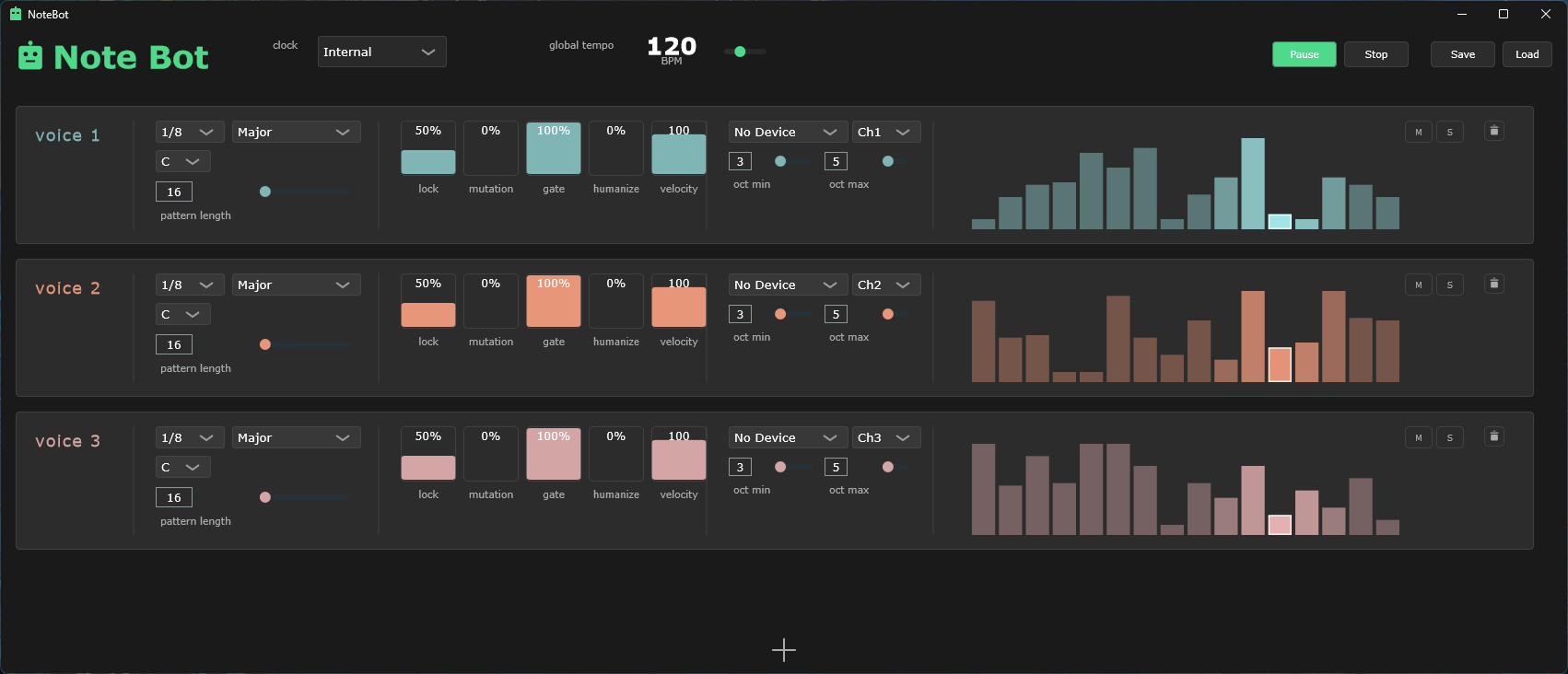
Note Bot application showing three active voices with teal, coral, and pink color schemes, animated visualizer bars, and full control panel

What Note Bot Does

Six capabilities that make it an essential generative music tool.

Turing Machine Core

Infinite melodic variation through controlled randomness. Dial the Lock parameter from pure chaos to a perfectly frozen loop — everything between is generative gold.

16 Independent Voices

Each voice is a fully isolated sequencer engine with its own scale, octave range, timing division, and MIDI routing. Stack them for dense polyrhythmic textures.

DAW Clock Sync

Locks to your DAW's MIDI beat clock quickly and tracks tempo changes smoothly. Run standalone on internal clock or synced to Ableton, FL Studio, Bitwig, and more.

Flexible MIDI Routing

Route each voice to any connected MIDI device and any channel (1–16) independently. Send voice 1 to a synth, voice 2 to a drum machine, voice 3 to a software instrument — simultaneously.

Real-Time Visualizer

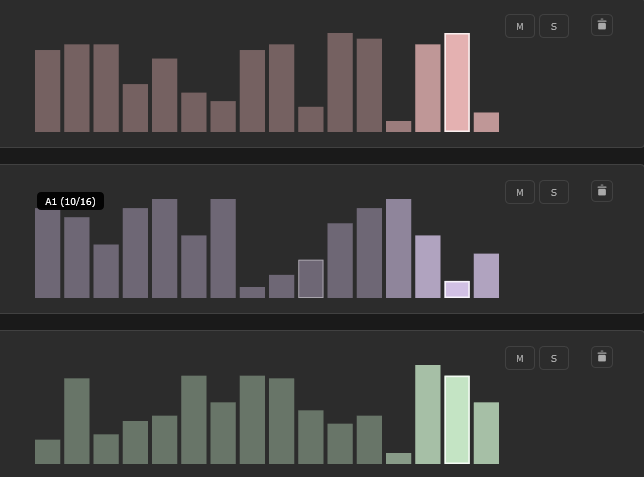
Each voice displays a live bar graph showing pitch height, velocity as brightness, and the active step highlighted. Watch your sequences evolve in real time at 30 FPS.

Live Performance Ready

Tweak every parameter in real time with no interruption to playback. Mute voices on the fly, shift scales mid-performance, add and remove voices dynamically. Save full sessions as JSON.

Note Bot In Action

Generative sequencing — live, unscripted, never the same twice.

Live recording — multiple voices running simultaneously, each on an independent Turing Machine sequence.

The Turing Machine

Three parameters. Infinite results.

LOCK

Pattern Stability

Controls how tightly each step is held. At 0% every step re-randomizes on each loop pass. At 100% the sequence freezes into a perfect repeating phrase. The sweet spot — 60–80% — is where generative music lives: familiar phrases with surprising variations.

0%Pure chaos
70%Evolving
100%Frozen loop
MUTATION

Evolution Rate

When a step is locked, Mutation adds a chance of subtle pitch variation — shifting notes by ±2 semitones while keeping the gate intact. High Lock + low Mutation = slow organic drift. Low Lock + high Mutation = rapid melodic transformation.

0%Static
15%Gentle drift
50%+Rapid shift
GATE

Note Density

Sets the probability that each step triggers a note at all. At 100% every step plays. At 50% roughly half the steps become silent rests. The Turing machine applies to your rhythm as well as your melody — Gate evolves too.

25%Sparse
60%Rhythmic
100%Dense
Close-up of three Note Bot voice visualizers showing animated bar graphs in pink/mauve, purple, and sage green — each voice on an independent sequence

Each voice's visualizer shows pitch height, gate density, and the highlighted current step — all updating at 30 FPS.

16 Independent Voices

Every voice is a fully isolated sequencer engine. Stack multiple voices running different scales and step lengths to create rich polyrhythmic textures — or route each one to a completely different synthesizer.

  • Independent lock, mutation, gate, and pattern length per voice
  • Route each voice to any MIDI device and any channel (1–16)
  • Per-voice scale quantization — 16 scales available
  • Per-voice octave range (min/max, 0–8)
  • Color-coded UI — identify and target voices at a glance
  • Mute individual voices without stopping the sequencer clock
  • Humanize timing and velocity per voice for natural feel
  • Anchor-based timing — change pattern lengths freely mid-playback, voices never fall out of sync
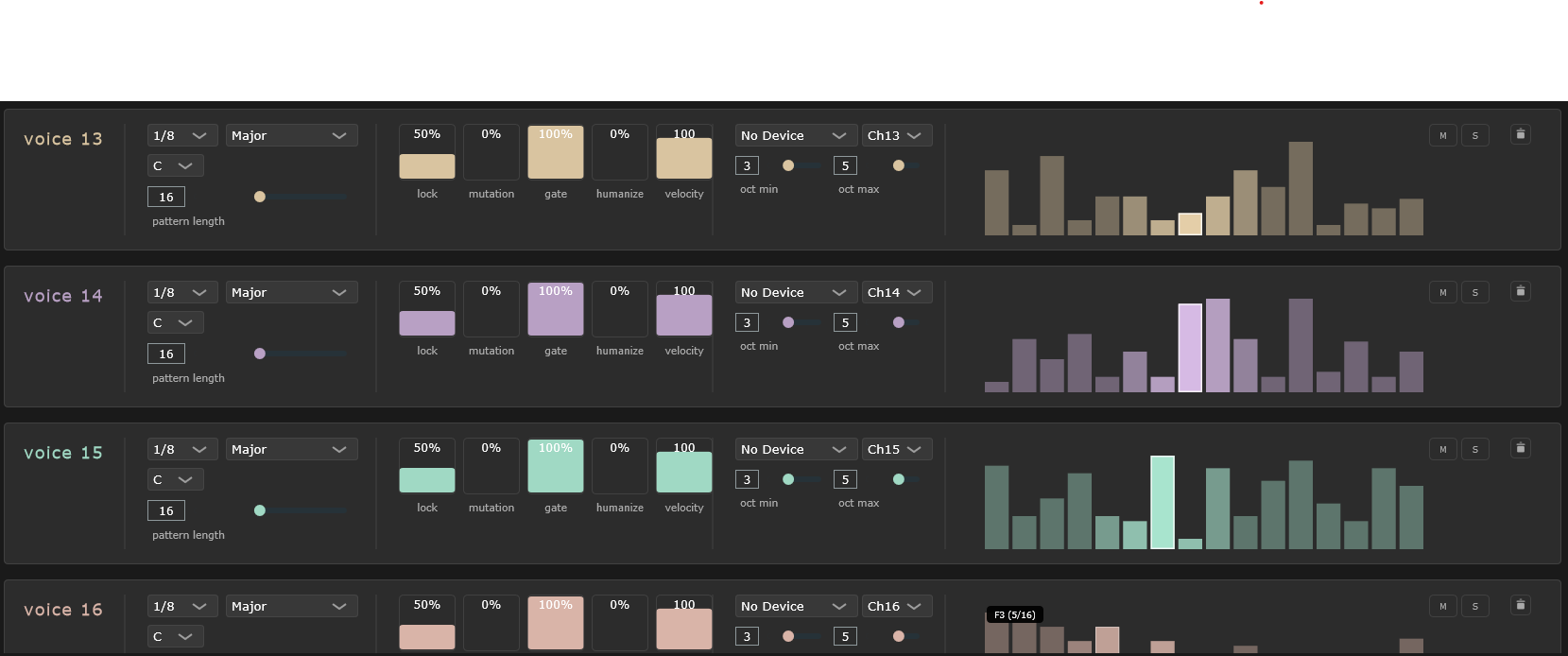
Note Bot showing voices 13 through 16 with amber, plum, jade, and soft coral accent colors — full color palette visible with active visualizer bars

Voices 13–16 showing the full color palette. Each voice row contains all controls fully independently.

MIDI Routing

Send notes to any device, any channel, in real time.

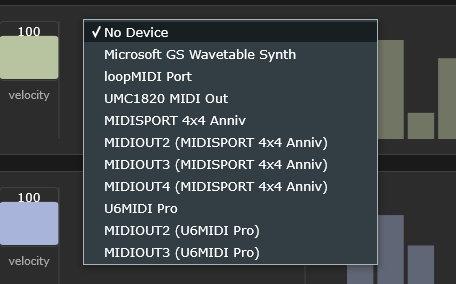
MIDI device dropdown showing connected hardware interfaces: Microsoft GS Wavetable Synth, loopMIDI Port, UMC1820 MIDI Out, MIDISPORT 4x4 Anniv, U6MIDI Pro

Any connected MIDI interface or virtual port appears in the device list. Hot-plug detection refreshes the list automatically.

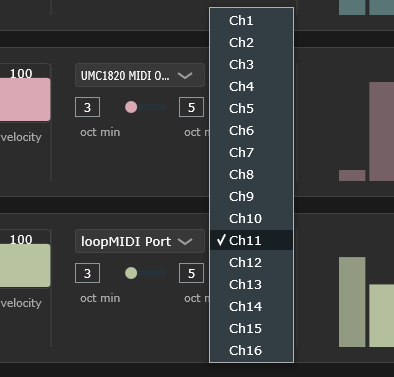
MIDI channel dropdown showing channels 1 through 16 with loopMIDI Port and UMC1820 visible for two adjacent voices

Full 16-channel selection per voice. Route drums to Ch10, bass to Ch1, and a lead melody to Ch3 — all running simultaneously.

Routing to a DAW via Virtual MIDI Port

To route Note Bot's output into your DAW on the same machine, you need a virtual MIDI port — a software loopback that appears as both an output device (for Note Bot) and an input device (for your DAW).

Windows: Install loopMIDI (free) by Tobias Erichsen. Open it, click + to create a new virtual port, and name it anything you like (e.g. "NoteBot Out"). Note Bot will see it as a standard MIDI output. In your DAW, set a MIDI track's input to that same loopMIDI port.

macOS: Use the built-in IAC Driver. Open Audio MIDI Setup (Applications → Utilities → Audio MIDI Setup), double-click IAC Driver in the MIDI Studio view, tick Device is online, and add a port. No extra software required — the IAC Driver is part of macOS.

Driving Hardware Synths Directly

Note Bot outputs standard MIDI, so it can sequence any hardware synthesizer, drum machine, or sampler that accepts MIDI input — no DAW required.

Connect a USB MIDI interface (any class-compliant USB MIDI interface) to your computer and cable its MIDI Out to your synth's MIDI In. Note Bot will see the interface as a standard output device and you can route individual voices directly to individual hardware instruments. Each voice on its own MIDI channel means you can simultaneously drive a bass synth, a lead synth, a drum machine, and a hardware arpeggiator — all from a single Note Bot session.

This works identically with modular synthesizers that have MIDI-to-CV converters, vintage hardware with 5-pin DIN MIDI, and modern instruments with USB MIDI. If it speaks MIDI, Note Bot can sequence it.

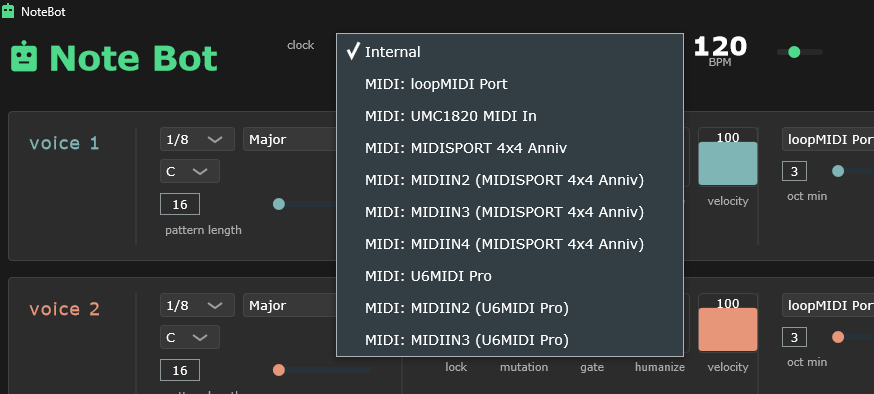
Note Bot clock source dropdown showing Internal selected, with loopMIDI Port, UMC1820 MIDI In, MIDISPORT 4x4 Anniv, and U6MIDI Pro available as external sources

Switch between internal clock and any connected MIDI device as an external clock source at any time.

Lock to Any Clock Source

Note Bot speaks standard MIDI Beat Clock — the same protocol used by every DAW, drum machine, groovebox, and hardware sequencer made in the last 40 years. Select any MIDI input device as your clock source and Note Bot locks tempo and phase in under 2 seconds, with no configuration required.

Clock protocol MIDI Beat Clock (24 ppqn)
Transport messages Start / Stop / Continue
Accuracy ±0.1 BPM
Lock time ~2 seconds
Phase drift None — anchor-based timing, no accumulation
Sync offset ±50 ms — trims note timing vs. incoming clock pulses
Standalone Internal clock, no external device required
Software clocks Ableton, FL Studio, Bitwig, Reaper, Logic, and more
Hardware clocks Drum machines, grooveboxes, hardware sequencers, modular
Sync active — receiving external clock
Syncing to Hardware

Any device that transmits MIDI Beat Clock can be the master — a Roland TR-8S, Arturia DrumBrute, Elektron Digitakt, Korg Volca, or any other hardware that has MIDI clock output. Connect its MIDI Out to a MIDI interface on your computer, select that interface as Note Bot's clock source, and start the hardware sequencer. Note Bot will follow the hardware tempo and stay locked for as long as it's running. Great for hardware-first setups where the DAW is optional or absent entirely.
How To Use Note Bot

From first launch to recording your first generative session.

  1. Set Up Your Virtual MIDI Port

    Before launching Note Bot, create a virtual MIDI port so you have a software destination to send notes to. On Windows, install loopMIDI (free) and create a new port. On macOS, open Audio MIDI Setup and enable the IAC Driver. This virtual port will appear in Note Bot's MIDI device dropdown and in your DAW's MIDI input list simultaneously.

  2. Choose a Clock Source

    The clock dropdown at the top of Note Bot defaults to Internal — use this to run Note Bot on its own tempo at whatever BPM you set. To sync with a DAW, switch the dropdown to your MIDI input device (e.g. "loopMIDI Port"), then press play in your DAW. Note Bot will detect the MIDI beat clock and lock its tempo within about 2 seconds. The green pulsing indicator confirms sync is active.

    Sync offset: When external clock is active, a sync offset slider appears (±50 ms). Use it to trim the timing of outgoing notes relative to the incoming clock pulses — handy for compensating latency through virtual MIDI ports. On Windows with loopMIDI, a value of 0 to −10 ms is typical.
  3. Configure Your First Voice

    Voice 1 is already loaded. Set its MIDI Device to any connected MIDI output — a virtual port, a USB MIDI interface, or a hardware synth — and pick a MIDI Channel. Choose a Scale (Major is a great starting point) and set a Root note. Adjust the Oct Min/Max range — try 3 to 5 for a comfortable mid-range result. Hit Play. The sequence starts generating immediately.

  4. Dial In Lock, Mutation, and Gate

    The five vertical sliders on each voice row are where the Turing magic happens. Start with Gate at 100%, Lock at 70%, and Mutation at 10–20%. This produces evolving but coherent melodic lines. Slowly reduce Lock to introduce more variation. Increase Mutation for faster harmonic drift.

    Slider interaction: Click anywhere on a slider to jump to that value instantly. Drag up/down to adjust continuously. Hold Shift while dragging for 5× finer control. Hold Alt while dragging to snap to preset values at 0%, 25%, 50%, 75%, and 100%.
  5. Add More Voices and Record

    Click + Add Voice to stack additional Turing engines. Route each voice to a different MIDI channel or device. Use different scales, pattern lengths, and timing divisions across voices to create polyrhythmic textures automatically. In your DAW, arm MIDI tracks on the channels Note Bot is sending to. Every take is unique — hit record and capture what you hear. Use Save to store your Note Bot session configuration for later recall.

    Pro tip: Try two voices on the same synth — one playing a major scale at 1/8 note, another a pentatonic at 1/16 note. The two independent Turing machines will drift in and out of rhythmic phase, generating complex counterpoint with zero manual programming.

Parameters Reference

Every control, explained.

Global

ParameterRangeDescription
Clock Source Internal / MIDI device Standalone internal clock or chase an external MIDI beat clock from a DAW or hardware sequencer
BPM 20–300 Tempo when using the internal clock. Click the number display to type a value.
Sync Offset −50 to +50 ms Visible only when external clock is active. Trims outgoing note timing relative to incoming MIDI clock pulses — use to compensate for virtual port latency (e.g. loopMIDI on Windows: 0 to −10 ms). Saved with presets.
Play / Pause / Stop Play starts all voices simultaneously. Stop sends All Notes Off to all active MIDI devices.
Save / Load Save and restore complete sessions — all voice parameters, sequences, and MIDI routing — as JSON files.

Per Voice  (×16)

ParameterRangeDescription
MIDI DeviceAny outputWhich MIDI interface or virtual port this voice sends notes to
MIDI ChannelCh1–Ch16MIDI channel for this voice's note output
Division1/32 – 1/1Step size relative to tempo. 1/8 at 120 BPM = 8 steps per bar.
Scale16 optionsMajor, Minor, Dorian, Phrygian, Lydian, Mixolydian, Aeolian, Locrian, Pentatonic Maj/Min, Blues, Harmonic Minor, Melodic Minor, Diminished, Whole Tone, Chromatic
RootC – BRoot note for scale quantization
Pattern Length4–32 stepsHow many steps before the sequence loops
Oct Min / Max0–8Octave range for generated notes. Min and Max lock together to prevent invalid ranges.
Lock0–100%Pattern stability. 0% = fully random each loop, 100% = frozen repeating phrase.
Mutation0–100%Pitch variation on locked steps — shifts notes by ±2 semitones without changing the gate.
Gate0–100%Probability each step fires a note. Acts as a note density and rhythmic control.
Humanize0–100%Adds Gaussian timing variation (±40ms) and velocity variation (±15) for a natural, non-quantized feel.
Velocity1–127Base MIDI velocity. Reflected as bar brightness in the visualizer.
Mute (M)On/OffSuppress MIDI output for this voice without stopping its internal sequence.
Solo (S)On/OffMute all other voices and hear only this one.