VISUVERB  ·  VST3 / AU  ·  macOS & Windows

Reverb shaped
by what you see.

Load any image. Let its luminance, edges, color temperature, or texture drive the parameters of an 8-channel feedback delay network. Four analysis modes, one continuous reverb engine — infinitely variable without preset menus.
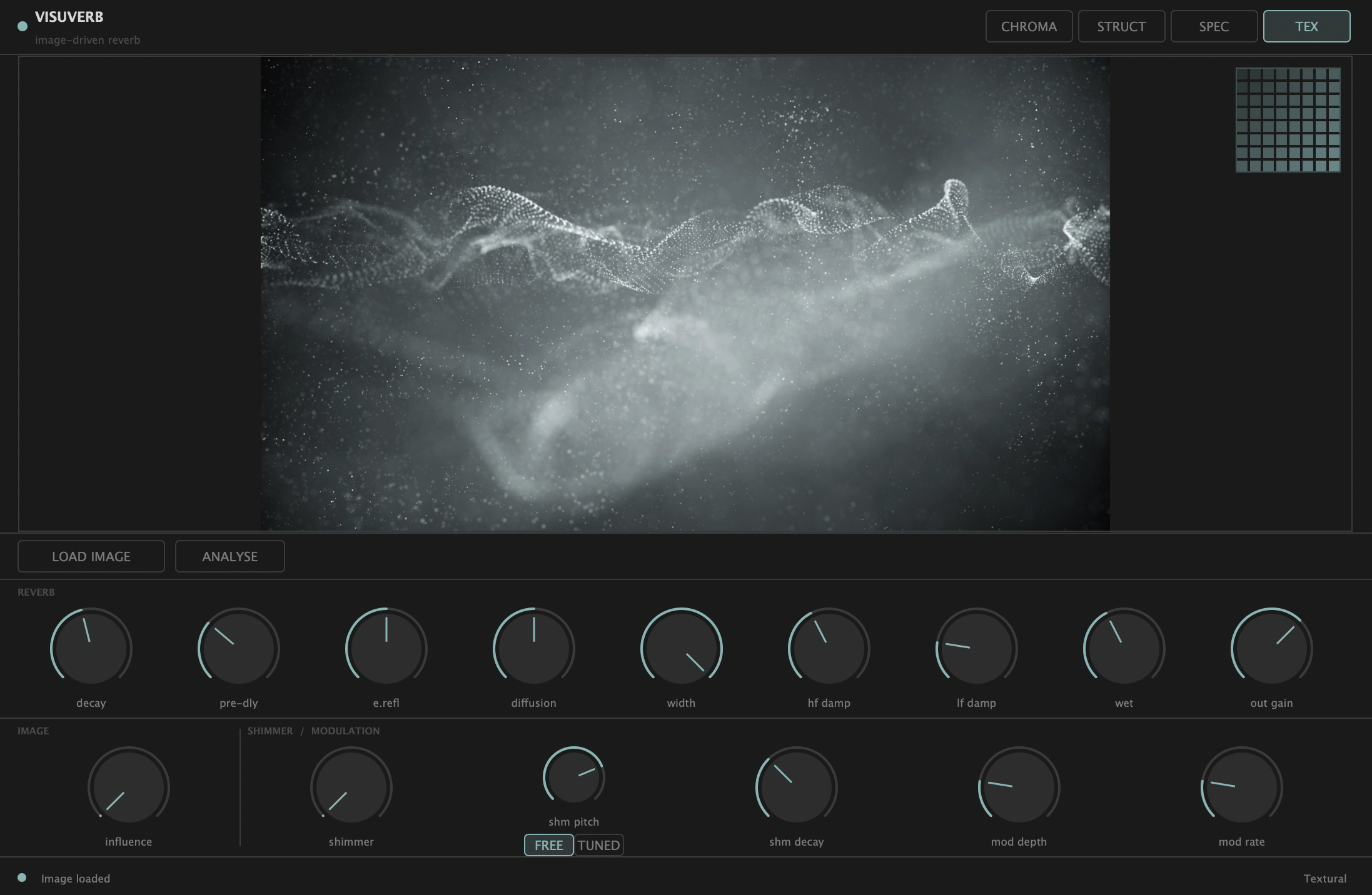
Visuverb plugin — full view with atmospheric smoke image loaded in Textural mode
8-LineFDN Core
4Analysis Modes
17Parameters
20sTail Length
VST3/AUmacOS / Win

Visuverb with a photograph loaded — Textural mode.

USD $29.99USD $14.99

Chromatic
Structural
Spectral
Textural
The Concept

Image as parameter source.

Visuverb treats any image as a data source for reverb design. A photograph of a cathedral, an abstract painting, a spectrogram screenshot — each produces a unique constellation of delay times, damping curves, and feedback topology that would be nearly impossible to reach by hand.

Load Any Image

Drag and drop any image file onto the plugin window, or use the Load Image button. JPEG, PNG, and most common formats are supported.

Choose an Analysis Mode

Select from four distinct algorithms — each reads the image differently and maps its features to different reverb properties.

Blend with Image Influence

The Image Influence knob crossfades continuously between your manual knob settings and the image-derived parameters. You're always in control.

i One reverb engine, continuous blending.

Visuverb uses a single 8-channel FDN reverb engine at all times. CPU usage stays constant and the reverb tail never cuts out or crossfades. The image only modifies how the engine is parametrized.

Analysis Modes

Four ways to read an image.

Each mode extracts fundamentally different information — the same image sounds different in every mode.

Mode 0

Chromatic

Reads the luminance histogram of the image. Brightness, contrast, tonal skew, and overall entropy map to core reverb character.

  • Bright image → long decay, open tail
  • Dark image → short decay, damped tail
  • High contrast → wider stereo, more mod
  • Complex histogram → increased diffusion
  • Warm colors → bass-extended tail
Mode 1

Structural

Applies Sobel edge detection to extract the image's geometry. Edge density and distribution shape the density and character of early reflections.

  • High edge density → denser early reflections
  • Grid / checker → percussive, room-like
  • Smooth / blurred → diffuse, smooth tail
  • Vertical edges → odd-line delay emphasis
  • Quadrant asymmetry → stereo width variation
Mode 2

Spectral

K-means++ clustering in CIE Lab colorspace groups the image's color temperature into four dominant clusters, mapping warm vs. cool tones to damping character.

  • Warm colors → less HF damping, darker tail
  • Cool colors → brighter, airier tail
  • Saturated image → wide modulation depth
  • Desaturated → neutral defaults
  • Mixed palette → complex damping curve
Mode 3

Textural

Performs 8×8 DCT on every tile of the image, accumulates AC frequency magnitudes, then synthesizes a unique impulse response via IFFT. Every image produces a different IR.

  • Dense texture → complex multi-tap IR
  • Smooth image → sparse, simple IR
  • High-frequency detail → bright sparkle
  • IR loaded into convolution engine for tail
  • Same image always = identical IR (seed fixed)
Visuverb mode selector — CHROMA, STRUCT, SPEC, TEX buttons

The mode selector in the plugin header — switch modes in one click. Analysis must be re-run after switching.

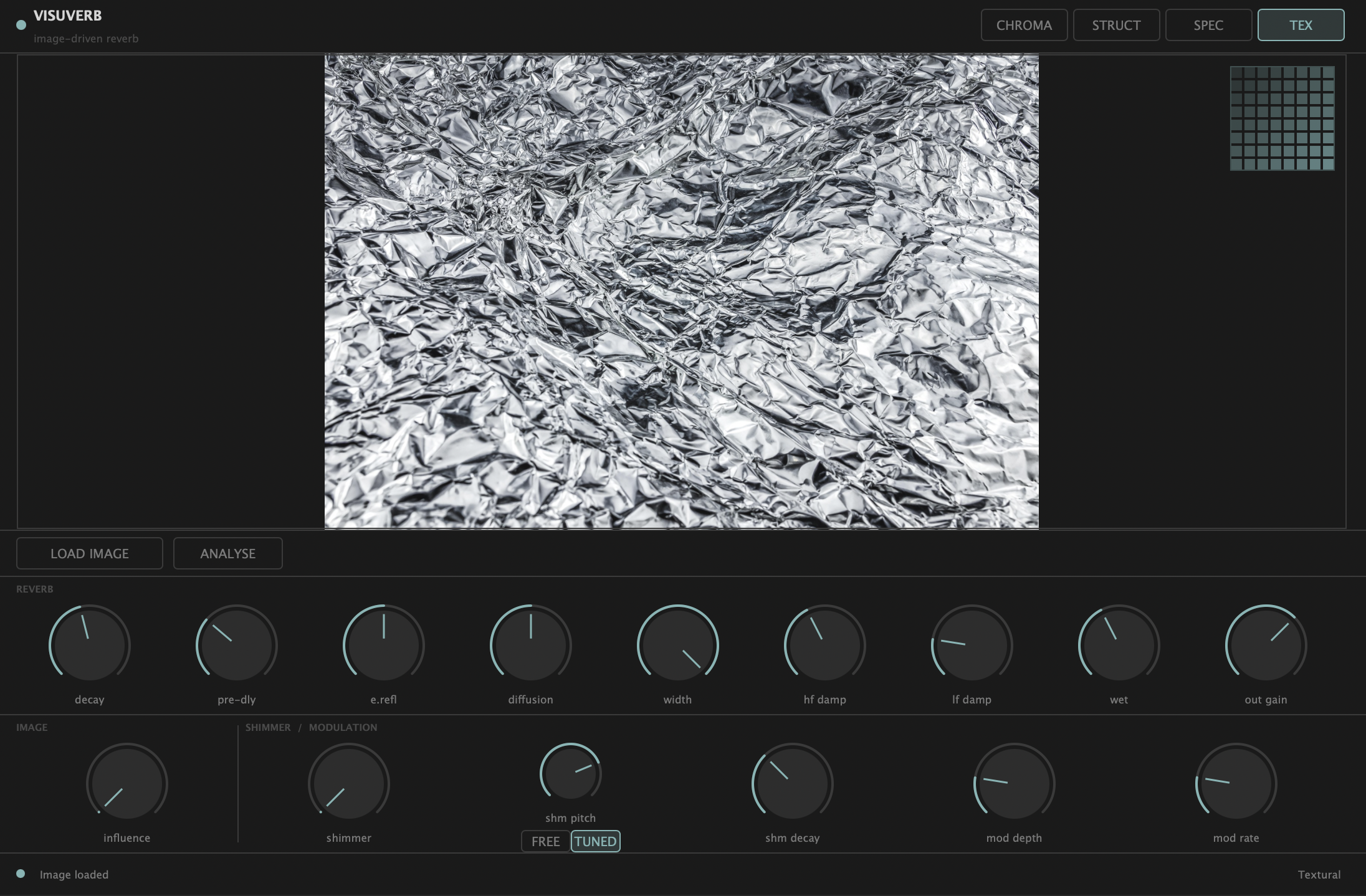
Visuverb in Textural mode with crumpled foil image loaded and analysis complete

Textural mode — analysis complete, IR loaded into convolution engine. The status bar shows the active mode name.

i Textural mode and convolution

Textural is the only mode that replaces the FDN's reverb tail with a convolution-based IR synthesized from the image. The FDN's pre-delay and diffusion stages still run, giving you texture from the image and spatial control from the knobs simultaneously.

Inside the Engine

8-channel feedback delay network.

Prime-adjacent delay times. Hadamard mixing matrix. Per-line damping, modulation, and feedback gain.

Input
Stereo L/R
Pre-Delay
0 – 200 ms
4× Allpass
5 / 11 / 19 / 28 ms
8-Line FDN
23–79 ms lines
Shimmer
phase vocoder
Stereo Split
Even → L, Odd → R
Wet / Dry
0 – 100%
Limiter
Soft 0.9 threshold
Output
±24 dB gain
Image-influenced stage
Fixed-topology stage
Visuverb reverb controls — decay, pre-dly, e.refl, diffusion, width, hf damp, lf damp, wet, out gain

Row 1 — the nine core reverb controls.

The FDN feedback loop

Eight delay lines run in parallel, each tuned to a prime-adjacent millisecond value (23, 29, 37, 41, 53, 61, 71, 79 ms). Each sample, every line is read, passed through HF and LF damping filters, mixed through an 8×8 Hadamard matrix, multiplied by per-line feedback gain computed from the RT60 formula, and written back with modulation applied.

When Image Influence is above zero, the delay times, per-line gain weights, and feedback matrix are all pulled toward image-derived values — smoothly interpolated block by block using a 512-sample crossfade to prevent clicks.

Reverb Controls

Nine parameters. One reverb space.

All controls smooth to prevent clicks on rapid changes. Image Influence can push any of these values from the image-derived side.

Decay Time
0.1 – 60.0 s  ·  default 2.5 s

Controls the RT60 of the reverb tail. Short values give a tight room feel; long values open into infinite bloom. Internally mapped to per-line feedback gain via the decay formula.

Pre-Delay
0 – 200 ms  ·  default 20 ms

Delay before audio enters the FDN. Creates separation between the dry signal and the first reflection, adding perceived room size without lengthening the tail.

Early Refl Mix
0 – 100%  ·  default 50%

Blends the output of the four allpass diffusers (early reflections) against the FDN's diffuse tail. Higher values add initial texture and density to the attack of the reverb.

Diffusion
0 – 100%  ·  default 50%

Allpass filter coefficient (0.4 – 0.75 range). Higher diffusion scatters energy more evenly, smoothing the reverb onset. Lower values let individual early echoes be audible.

Stereo Width
0 – 100%  ·  default 100%

Controls stereo separation of the output. At 100%, even-indexed delay lines sum to the left channel and odd-indexed lines sum to the right. At 0%, output collapses to mono.

HF Damping
0 – 100%  ·  default 40%

One-pole lowpass filter applied in the FDN feedback path. Higher values progressively roll off high frequencies with each loop, producing a darker and more natural-sounding decay.

LF Damping
0 – 100%  ·  default 20%

Controls low-frequency damping in the feedback path. Higher values reduce bass energy with each loop, tightening the low end. Useful for preventing muddy buildup in dense mixes.

Wet / Dry Mix
0 – 100%  ·  default 40%

Final blend between the processed (wet) reverb signal and the original (dry) input. The dry signal is preserved in a separate buffer and never passes through the FDN.

Output Gain
−24 to +12 dB  ·  default 0 dB

Makeup gain applied after the soft limiter. The built-in limiter (threshold 0.9, 150 ms release) prevents clipping even at extreme settings, so Output Gain is safe to push.

Image Influence

You're always in control.

The Image Influence knob is a continuous blend between two states: your manual knob positions (at 0%) and the parameter set derived from the image analysis (at 100%). At any position in between, each reverb parameter is linearly interpolated.

This means you can use the image as a starting point and then fine-tune manually, or use your manual knobs as an anchor and let the image nudge the character. The knobs always define one endpoint of the blend.

i Damping protection

To prevent images from pushing the reverb into an unusable state, analysis results can lower HF or LF damping freely, but cannot raise them more than 15% above your current knob values. This preserves the reverb's tail at high influence settings.

i Loading and re-analyzing

Drag any image file directly onto the plugin window, or click Load Image. After loading, click Analyse to run the analysis for the currently selected mode. If you switch modes, you need to click Analyse again — each mode produces different results from the same image.

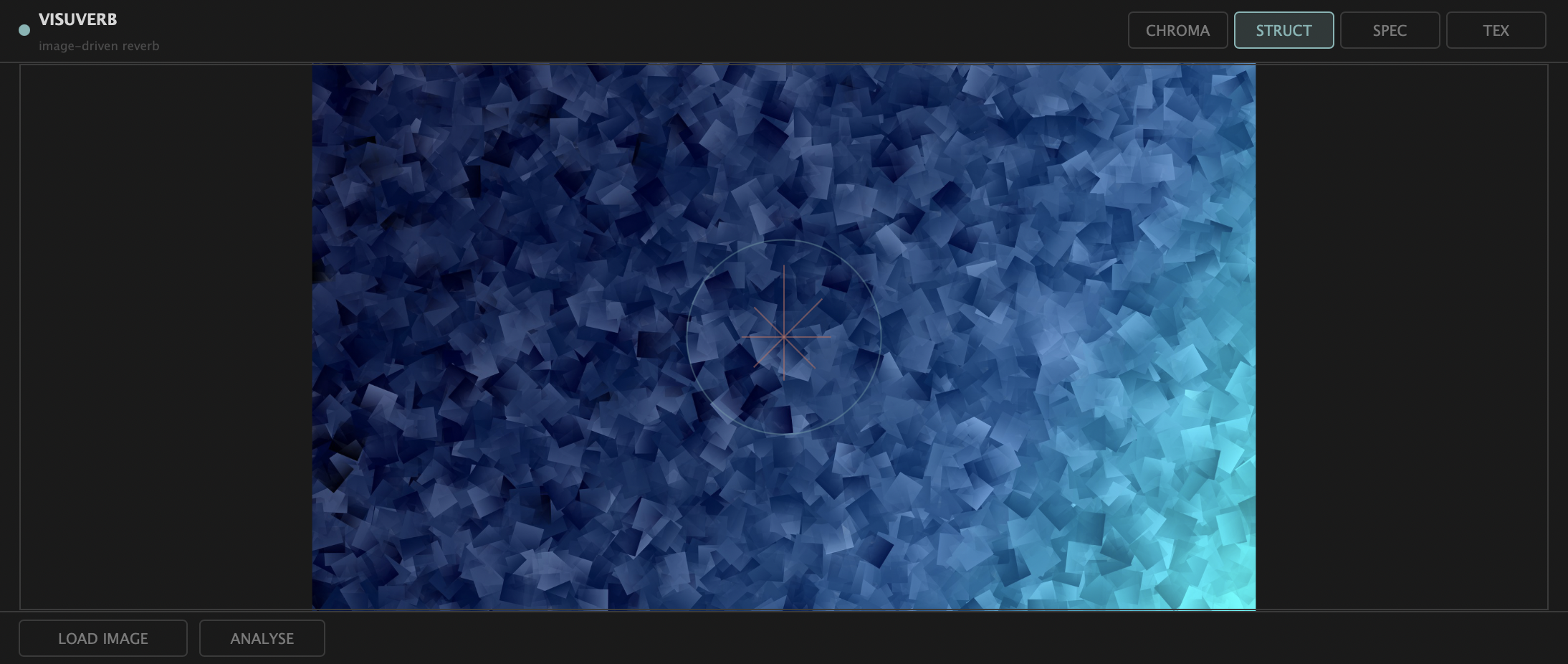
Visuverb image zone with a blue geometric image loaded in Structural mode

The image display zone — drag and drop any image here, or use Load Image.

Shimmer

Pitch-shifted feedback bloom.

A phase-vocoder pitch shifter runs in the FDN feedback path, creating the shimmer effect without time drift or instability.

Visuverb shimmer and modulation controls — influence, shimmer, shm pitch, FREE/TUNED toggle, shm decay

The shimmer controls — Amount, Pitch (semitones), Decay multiplier, and Harmonic Lock toggle.

Phase-vocoder pitch shifter

The shimmer processor uses a streaming STFT phase vocoder (Bernsee/DAFX method): overlapping 2048-point Hann-windowed frames (4× oversample, 75% overlap) are FFT'd, each bin's true instantaneous frequency is estimated from inter-frame phase differences, spectral bins are remapped by the pitch ratio, and a phase-coherent spectrum is resynthesised via IFFT and windowed overlap-add. Because analysis hop equals synthesis hop, output length always matches input — shimmer can sustain indefinitely at any pitch without time drift. On a sustained reverb tail the phase vocoder's only weakness (transient smearing) never shows, so the result is smooth and artefact-free.

Shimmer Amount
0 – 100%  ·  default 0%

Wet level of the pitch-shifted signal injected into the FDN. Internally capped at 55% to prevent feedback instability. At 100% control position, the shimmer blooms noticeably but stays stable.

Shimmer Pitch
−24 to +24 st  ·  default +12

Pitch-shift amount in semitones. +12 = octave up (classic shimmer). −12 = octave down for a darker bloom. Any value produces a valid effect; Harmonic Lock can constrain it to musical intervals.

Shimmer Decay
0.5× – 2.0×  ·  default 1.0×

Multiplier applied to the RT60 feedback gain for the shimmer path. Above 1.0, the shimmer bloom extends longer than the dry tail. Below 1.0, it fades faster. Values above 1.5 produce very long spatial effects.

Harmonic Lock
FREE / TUNED toggle

When TUNED, quantizes the shimmer pitch to the nearest allowed musical interval regardless of the Pitch knob position. When FREE, uses the exact knob value. See intervals below.

Harmonic Lock intervals (TUNED mode)

When Harmonic Lock is enabled, the pitch snaps to one of these musically consonant intervals:

−24st (2 oct ↓) −19st (oct + 5th ↓) −17st (oct + 4th ↓) −12st (oct ↓) −7st (5th ↓) −5st (4th ↓) 0st (unison) +5st (4th) +7st (5th) +12st (octave) +17st (oct + 4th) +19st (oct + 5th) +24st (2 oct)
Modulation

Per-line LFO with staggered phases.

Each of the eight FDN delay lines has an independent LFO modulating its effective length. The LFOs share the same rate and depth, but are offset in phase by equal steps around the full cycle — this distributes the modulation energy evenly and prevents audible beating between lines.

At low rates (0.1 – 0.5 Hz) and moderate depth, the effect is a slow, organic chorus-like breathiness. Raising the rate into the 1–5 Hz range adds a classic pitch-modulated quality. Above 5 Hz, flanging effects emerge as the delay time variation becomes perceptible as a pitch wobble.

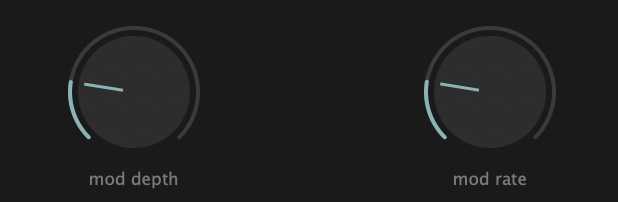
Mod Depth
0 – 100%  ·  default 20%

Amplitude of the LFO applied to each delay line. At 100%, delay time variation is ±0.5% of the base delay. Larger depth = wider, more pronounced modulation.

Mod Rate
0.1 – 10.0 Hz  ·  default 0.5 Hz

LFO frequency. Exponentially scaled so fine control is available in the sub-1 Hz range. Low rates work best for ambient pads; higher rates suit rhythmic material or special effects.

Visuverb modulation controls — mod depth and mod rate knobs

Mod Depth and Mod Rate — the two modulation controls.

Getting Started

How to use Visuverb.

Five steps from installation to your first image-driven reverb.

1

Install the plugin in your DAW

Install the plugin format appropriate for your OS and DAW (VST3 or AU). Once installed, rescan in your DAW and insert Visuverb on any stereo or mono track as a send or insert effect.

2

Set up a reverb manually

Before touching the image controls, set a baseline reverb using the nine core knobs. Dial in Decay Time, HF Damping, Diffusion, and Wet/Dry to your preference. This becomes the "0% influence" state — the anchor your image will blend from.

3

Load an image

Drag and drop any image file directly onto the plugin's image zone, or click the LOAD IMAGE button and browse. The image is displayed in the plugin window immediately. JPEG and PNG are recommended.

4

Choose a mode and run analysis

Select an analysis mode using the mode selector in the header (Chromatic, Structural, Spectral, or Textural). Then click ANALYSE. A progress indicator appears in the status bar. Analysis typically completes in under a second for most images.

5

Raise Image Influence to blend

Turn up the Image Influence knob (in Row 2 of controls) from 0% toward 100%. The reverb character smoothly transitions toward the image-derived parameters. Automate this knob for dynamic, evolving reverb that changes with your arrangement.

FormatVST3 / AU
PlatformmacOS / Windows
Audio I/OStereo (2 in / 2 out)
Tail Length20 seconds
Latency (VST3 / AU)Zero (non-Textural modes)
CPU (44.1 kHz / 512)< 5% (typical)
Parameters17 (16 automation-ready)
Analysis ThreadBackground (non-blocking)

Tips

  • Try the same image across all four modes to hear how differently it's interpreted — results are often surprisingly distinct.
  • For ambient pads, use Chromatic mode with a bright, airy photograph and push Image Influence high. For drum rooms, try Structural mode with an architectural photo.
  • Automate Image Influence as a macro — 0% is your "dry" reverb, 100% is the image's personality. Automate between them for movement.
  • Textural mode pairs well with the Shimmer controls — the synthesized IR gives you the room, the shimmer adds the bloom on top.
  • Harmonic Lock is most useful when Shimmer Pitch is near an interval boundary — it prevents the pitch from wavering between two intervals as the knob is moved.
  • The DAW will correctly compensate latency when Textural mode is active — the plugin reports its convolution latency via the standard VST3 mechanism.
Reference

Parameter reference.

All 17 parameters — ranges, defaults, and descriptions.

Reverb Core
Parameter Range Default Unit Description
Decay Time image 0.1 – 60.0 2.5 seconds RT60 of the reverb tail. Internally converts to per-line feedback gain via the decay formula. Smoothed over 50 ms.
Pre-Delay image 0 – 200 20 ms Delay before audio enters the FDN. Stereo buffer, linear interpolation. Creates perceived room size.
Early Refl Mix 0 – 100 50 % Balance between allpass diffuser output (early reflections) and the late diffuse FDN tail.
Diffusion image 0 – 100 50 % Allpass coefficient (0.4 + value × 0.35). Higher = smoother onset; lower = audible individual echoes. Smoothed 20 ms.
Stereo Width image 0 – 100 100 % Separation between even-indexed (L) and odd-indexed (R) delay lines. 0% = mono collapse. Smoothed 10 ms.
HF Damping image 0 – 100 40 % One-pole lowpass in feedback path. Higher = darker tail. Image cannot raise this more than 15% above knob value. Smoothed 10 ms.
LF Damping image 0 – 100 20 % One-pole highpass in feedback path. Higher = less bass rumble. Same damping-cap rule as HF Damping. Smoothed 10 ms.
Wet / Dry Mix 0 – 100 40 % Final blend between processed reverb output and original dry signal. Dry path is a separate buffer, not affected by FDN. Smoothed 10 ms.
Output Gain −24 to +12 0 dB Makeup gain after the soft limiter. Safe to use aggressively — the 0.9-threshold limiter prevents clipping at the output stage. Smoothed 10 ms.
Image Analysis
Parameter Range Default Unit Description
Image Influence 0 – 100 0 % Blend between manual knob values (0%) and image-derived parameter set (100%). Linear interpolation per parameter per block.
Analysis Mode 0 – 3 0 choice Selects the image analysis algorithm: 0 = Chromatic, 1 = Structural, 2 = Spectral, 3 = Textural. Switching mode requires a new Analyse run.
Shimmer
Parameter Range Default Unit Description
Shimmer Amount 0 – 100 0 % Wet level of pitch-shifted signal in FDN feedback. Internally capped at 55% to prevent instability. Smoothed 30 ms.
Shimmer Pitch −24 to +24 +12 semitones Pitch-shift amount. In TUNED mode, quantized to nearest allowed interval. Any value valid in FREE mode.
Shimmer Decay 0.5 – 2.0 1.0 × multiplier RT60 gain multiplier for shimmer feedback path. >1.0 extends shimmer longer than the dry reverb tail.
Harmonic Lock FREE / TUNED FREE toggle TUNED mode quantizes shimmer pitch to musically consonant intervals: ±24, ±19, ±17, ±12, ±7, ±5, 0 semitones.
Modulation
Parameter Range Default Unit Description
Mod Depth 0 – 100 20 % LFO amplitude applied to each delay line. Maximum ±0.5% of base delay time. Eight independent LFOs share this depth. Smoothed 20 ms.
Mod Rate 0.1 – 10.0 0.5 Hz LFO frequency. Exponential scale favors sub-1 Hz range. Each delay line's LFO is phase-staggered by 1/8 of the full cycle. Smoothed 50 ms.

image Parameters marked with this badge can be pushed by Image Influence toward image-derived values when Influence > 0%.